1 Welcome!
Settling in
- Sit in groups of 3-4. Your group should include:
- nobody that you already know
- at least 1 person who has used RStudio before
- Meet the people at your table. Share your names and pronouns. Discuss your favorite day of your winter break.
- I encourage you to have a notebook dedicated to this course.
- Know that everything you see up here is in the online manual:
- https://bcheggeseth.github.io/155_spring_2026/ (also linked in Moodle)
- left side bar > I. Simple Linear Regression > 1 Welcome!
Welcome to Stat 155
Statistical Modeling?!
Statistical Modeling is the art and science of turning data into information about relationships of interest.
. . .
For example, the following are just a few Mac faculty / offices that use statistical models to study relationships:
- Michelle Tong (BIOL): Making “Good” Choices: Social Isolation in Mice Exacerbates the Effects of Chronic Stress on Decision Making
- Ariel James (PSYCH): Language Experience Predicts Eye Movements During Online Auditory Comprehension
- Sarah West (ECON): Redevelopment along arterial streets: The effects of light rail on land use change
- Athletics uses data to help understand various relationships (eg: sleep & outcomes, strength over time, etc)
. . .
This class is designed for you.
STAT 155 is a modern, non-traditional introduction to statistics. We’ll explore sophisticated tools that typically aren’t covered until a second course in statistics.
- This means:
- Non-majors taking this as a terminal course will take away highly applicable and marketable knowledge & critical thinking skills.
- Majors will gain a solid foundation from which to study more advanced models & theory.
- This does NOT mean that we’re skipping a course! STAT 155 teaches introductory statistics content, but through a different lens (regression) than a traditional course (only looking at relationships between 2 things). Relatedly…
- This means:
Thriving in STAT 155 is NOT correlated with the following:
- your major,
- whether you think you’re a “math person,”
- whether you have any previous idea what “statistical modeling” is, etc.
Thriving IS correlated with effort (time, practice, studying, completing assignments without relying on AI) and engagement (attendance, attention, collaboration, reflection).
STAT 155 emphasizes statistical applications and conceptual understanding over theory (and hand calculations). To do that, we’ll utilize statistical software (R/RStudio). It’s assumed that you are totally new to RStudio! More on this later…
- If you might be a future Stat, Data Science, or Economics major, I recommend you engage with the theory we cover and go beyond a surface-level understanding. You’ll thank me later!
I love teaching this course and hope you end up loving statistics as much as I do!
Introductions & Data Principles
GOAL
Get to know one another a bit better while exploring some basic principles of statistical modeling / working with data.
EXAMPLE 1: Tidy data
You filled out a quick fun survey before class.
The result is a tidy data set! Meaning:
- each row = a case or unit of observation (here, a student)
- each column = a measure on some variable of interest, which is either…
- quantitative (numbers with units), e.g.
age - categorical (discrete possibilities or categories), e.g.
major
- quantitative (numbers with units), e.g.
- each entry contains a single data value; no analysis, summaries, footnotes, comments, etc
. . .
EXAMPLE 2: Academic interests
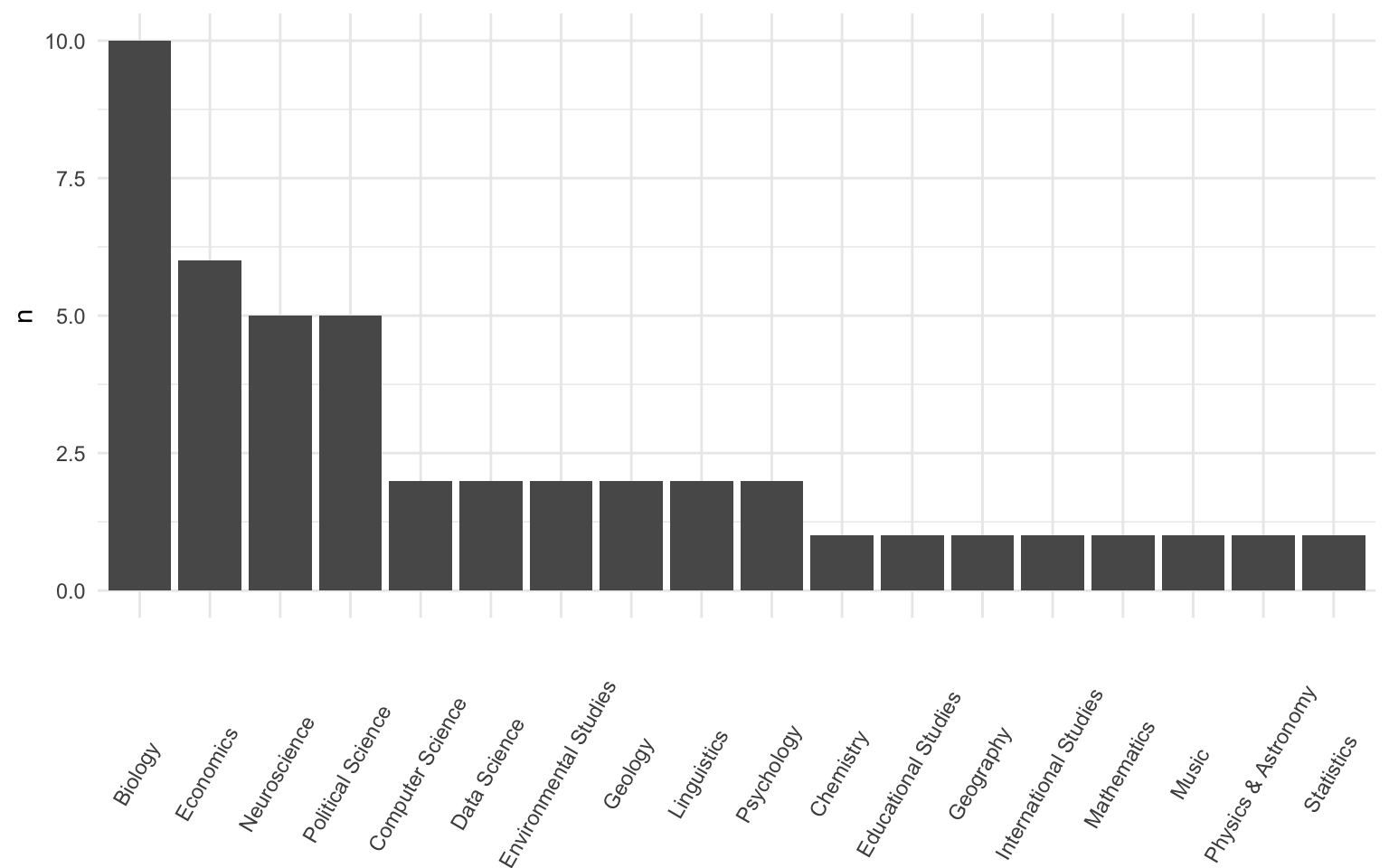
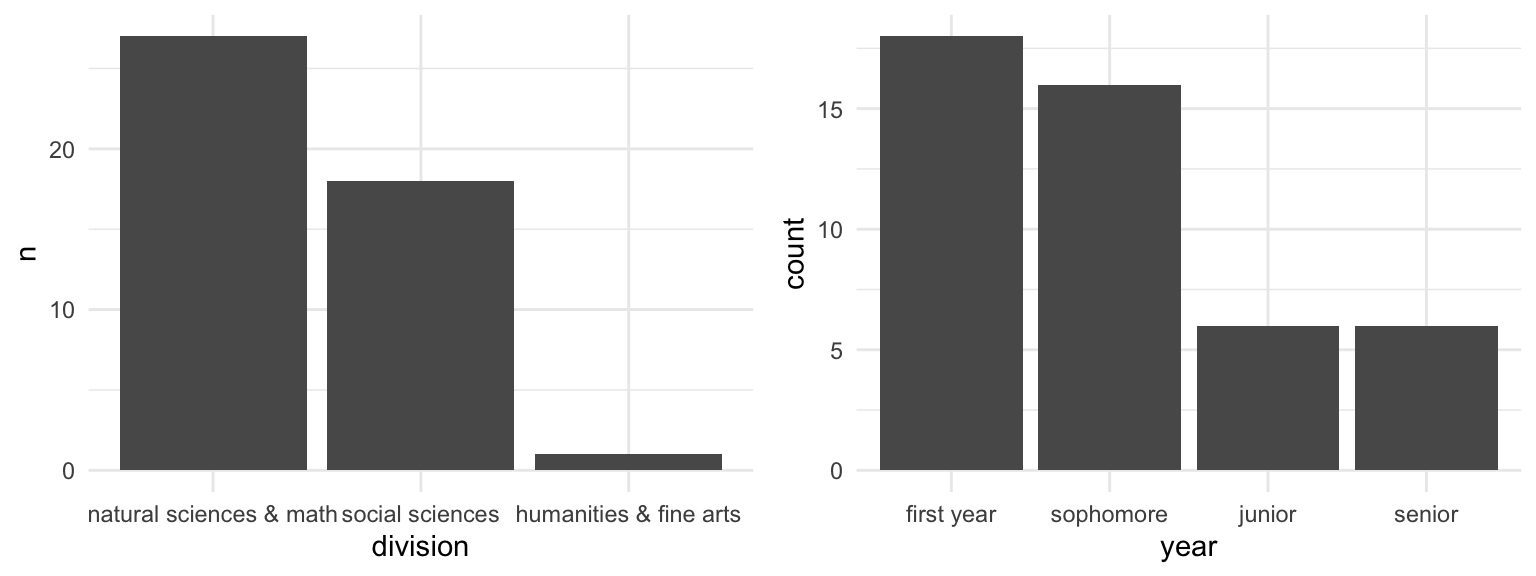
Below are 3 plots of students’ majors, major divisions, and years in school.
Summarize what you learned about the students in this class.
Suppose a researcher wants to use these data to learn about the academic interests among the broader Mac student body. Is this a good idea? Why or why not?
EXAMPLE 3: Relationships
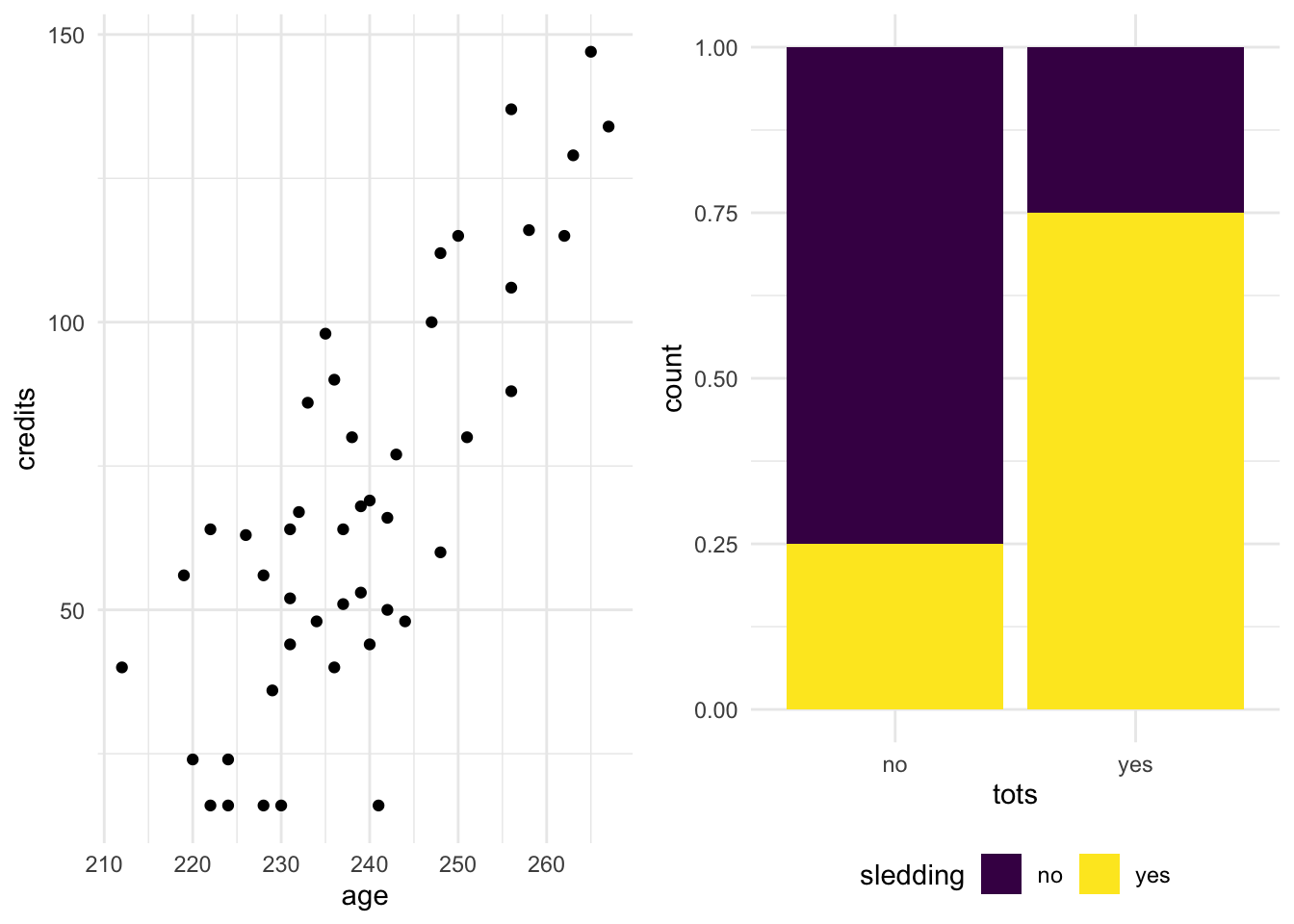
Left plot: Check out the relationship between the number of
creditssomebody has earned (y-axis) vs theiragein months (x-axis). Describe what you observe.Right plot: Check out the relationship between students’ prior experience with trying tater tot hotdish and trying sledding. Describe what you observe.
After observing this plot, your friend comments that if we give somebody free hotdish, they’ll be more likely to try sledding. Do you agree?
EXAMPLE 4: Conclusions
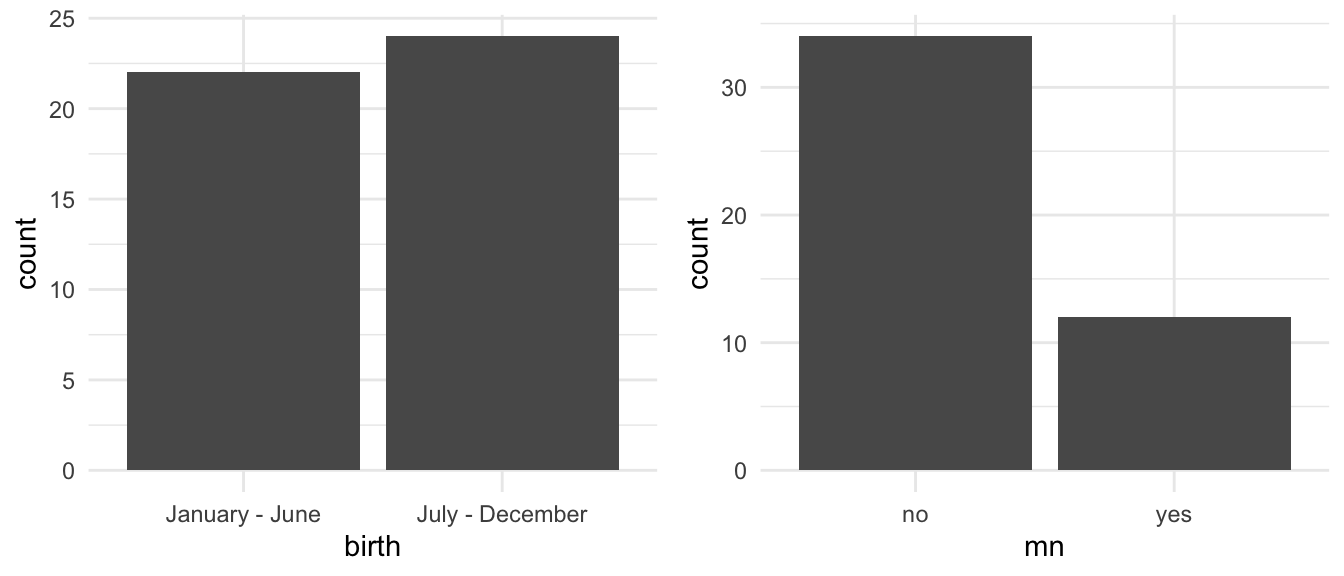
- Check out the breakdown of students’
birthmonths (left plot).- Are more students born in the 1st or 2nd half of the year?
- Assuming that this class is representative of the broader student body, does this provide substantial evidence of a broader birth trend at Mac?
- Check out the breakdown of whether students lived in MN before attending Mac (right).
- Did fewer than half of students in this class live in MN before?
- Assuming that this class is representative of the broader student body, does this provide substantial evidence that fewer than half of Mac students lived in MN before?
PAUSE
Once you’re finished with the above exercises, let the instructor know. Do not work ahead. Instead, use any extra time to chat with one another!
Data principles
The exercises above help illustrate some important data principles.
- Data collection
- Sampling bias occurs when a sampling method produces samples that are not representative of the population of interest, thus can produce biased results. Example: Our STAT 155 sample would produce a biased understanding of Mac students’ academic interests.1


. . .
- The 5 W’s + H: who, what, when, where, why, and how?
From the course notes:- Who collected this data?
- What is being measured?
- Where were the data collected? One location? Multiple locations?
- When was the data collected? One point in time? Over time?
- How were the data collected? What instruments or methods were used? What questions were asked and how? Online survey? By phone? In person?
- Why were they collected? For profit? For academic research? Are there conflicts of interest?
. . .
- Response bias
Even if we design a good sample, there might still be response bias: when subjects give incorrect responses (purposely or not). This could be the result of a direct lie, question wording, the positionality of the data collector, etc.
. . .
- Data analysis
- correlation vs causation
An observational study in which data are observed with NO manipulation of the subjects’ environment may reveal a correlation/association. However, cause-and-effect must be established via a controlled experiment (or causal inference tools). Example: There’s no cause-and-effect relationship between tater tots and sledding.2
- correlation vs causation

. . .
- exploratory vs inferential questions
- Exploratory question: What did we observe among our sample data?
(eg: did fewer than half of students in our class live in MN before?) - Inferential question: From this, what can we conclude about the broader population?
(eg: can we conclude from our data that fewer than half of Mac students lived in MN?)
- Exploratory question: What did we observe among our sample data?
. . .
- Data ethics (not addressed in the questions above)
We must ask:- What are the 5 W’s + H?
- What are the implications and impact of the data collection and analysis, both individual and societal?
. . .
Exercises
MOTIVATION
“Doing” statistical modeling and working with data in general requires statistical software – calculators, spreadsheet functionality, etc don’t cut it. We’ll exclusively use R and RStudio:
Why R/RStudio?
- it’s free
- it’s open source (the code is free & anybody can contribute to it)
- it has a huge online community (which is helpful for when you get stuck)
- it’s an industry standard
- it can be used to create reproducible and lovely documents (including this online manual!)
- Fun fact: it was started by Mac alum JJ Allaire and beta-tested at Mac!
IMPORTANT: RStudio is NOT the point of this course!!
- RStudio = a hammer
- Simply a tool needed for statistical modeling that you’ll learn through lots of practice, trial, and error.
- Alone, it’s not very interesting.
- You = a carpenter
- You will develop the knowledge about designing statistical analyses that are useful and correct.
- You will learn to build these analyses with the appropriate tools (RStudio).
- Your analyses, not use of RStudio, are the interesting part!
- You’ll pick up the RStudio basics needed for introductory statistical models. To learn more about RStudio more generally you should take COMP/STAT 112.
GOAL & DIRECTIONS
After class, you’ll install R/RStudio on your own machine. For today only, just to get a feel for the R language, you’ll interact with it via this manual. Throughout:
- Work on these exercises in your groups. (Collaboration is a key learning goal in this course, which we’ll discuss in the coming classes.)
- Have you used R/RStudio before? Remember what it was like when you were first learning, and help others with that process.
- Take your time. You won’t hand anything in and can finish up outside of class.
- We will not discuss these exercises as a class. Your group should ask me questions as I walk around the room.
Exercise 1: Use R as a calculator
Part a
Run the following “chunks”, one by one, hitting the “Run Code” button in the top right. In some cases you might even get an error! This error is important to learning how R code does and doesn’t work.
Part b
Your turn. In the chunk below, multiply the sum of 1578 and 209 by 3. Your answer should be 5361.
Exercise 2: Functions and arguments
We can also use built-in functions to perform common tasks. These functions have names and require information about arguments in order to run:
function(argument)
Part a
Discuss with your group what you think the following code will return:
sqrt(9)nchar("macalester")sqrt(nchar("snow"))
Part b
Check your intuition. Try out the following functions one by one. For each function, note its…
- name
- the argument or information it needs to run
- what output it produces (what the function does)
- how the name connects to what the function does
Part c
Some functions have more than 1 argument, separated by commas:
function(argument1 = ___, argument2 = ___)
Try out the following, one by one.
Finally, R is case sensitive. Try using Rep() instead of rep(). Take time to read the error message!
Part d
Your turn! In the chunk below, use functions to obtain the following:
- a vector of 7 3’s: 3 3 3 3 3 3 3
- a vector of 3 7’s: 7 7 7
- the square root of 36
Exercise 3: Save it for later
We’ll often want to store some R output for later use. In R we type something of the form:
name <- output
where name is the name under which to store a result, output is the result we wish to store, and <- is the assignment operator (I think of this as an arrow pointing the output into the name).
Part a
IMPORTANT: Try out each line one at a time. Why doesn’t the first line produce any output?
Part b
Your turn. In the chunk below. Store your age in years as my_age. Then add 10 years to my_age.
Exercise 4: Import data
Next, let’s work with some data!! The first step is importing our data into RStudio. How we do this depends on:
- file format (eg: .xls Excel spreadsheet, .csv, .txt)
- file location (eg: online, on your desktop, built into RStudio itself).
The data from the survey you took before class is stored as a .csv file named welcome_155_s26.csv, inside this online manual. Import this data using the read_csv() function, and store it as survey using the code below. The only thing that prints out is some info about the data, not the data itself. All we did was store, not print, the data so that we can use it later.
Below is a scrollable version of this data:
Exercise 5: Get to know the data
PAUSE: Make sure you’re still in sync with your group.
Before we can learn anything from our data, we must understand its structure. For each function below:
- try it out
- discuss with your group what the function does
- discuss with your group how the function’s name connects to what it does
Exercise 6: Code = communication
It’s important to recognize from day 1 that code is a form of communication, both to yourself and others!!!!! Code structure and details are important to readability and clarity, just as grammar, punctuation, spelling, paragraphs, and line spacing are important in written essays. All of the code below works, but has bad structure. With your group, discuss what is unfortunate about each line, then make it better.
Similarly, discuss what is unfortunate about each line below, then make it better. NOTE: Nothing will print here since we’re just storing the number 13.
Exercise 7: You will make so many mistakes!
Mistakes are common when, and even important to, learning any new language. You’ll get better and better at interpreting error messages, finding help, and fixing errors. In addition to finding help online, R has built-in help files. For example:
- Type
?repand then run the code chunk. - Quickly scroll through the documentation that pops up, noting the type of information provided.
- Pause at the “Examples” section at the bottom – perhaps the most useful section! Try out a couple of the provided examples in your chunk.
Exercise 8: Your turn
In the chunks below, use R code to do the following.
Part a
Import & store data on different Himalayan peaks from the following file which is stored within this online manual: himalayas.csv NOTE: A codebook, i.e. a description of the data, is here.
Below is a scrollable version of this data:
Part b
Use a function to show which variables are recorded on each peak.
Part c
How many peaks are included in the dataset? Answer this using a function, not by counting up the rows yourself.
Part d
Show the first 6 rows of the dataset. NOTE: This gives us a quick glimpse without having to print out the entire dataset!
Part e
Any ethical concerns about this data?
Exercise 9: Make a “cheat sheet”
You will continue to pick up new R code and ideas. You’re highly encouraged to start tracking this in a cheat sheet (eg: in a Google doc). The cheat sheet will be a handy reference for you, and the act of making it will help deepen your understanding and retention.
Exercise 10: Install R & RStudio on your machine
Carefully follow the directions in the appendix of our online course manual to install R and RStudio on the machine that you plan to use for this class.
Wrap-up
Finish the activity
If you didn’t finish the activity during class, no problem! Be sure to complete the activity outside of class, review the solutions in the online manual, and ask any questions on Slack or in office hours.
Online course manual (linked on Moodle)
- Bookmark this!
- All in-class activities and other resources will be compiled here, making for easier review.
- There are solutions at the bottom of each activity. Consult them!
- There’s a daily Course Schedule which outlines what we’re doing, what’s due, and where to find this material each day.
Moodle
Where you can access a big picture calendar (which you should integrate into your Google calendar!) and all course materials (free!). Also where you will submit work.
Syllabus (linked on Moodle)
You’re expected to carefully review the syllabus outside of class.
Upcoming due dates
If you were approved from the waitlist, be sure to approach me after class & register for the course today. At that point you will be added to Moodle.
Before next class: Checkpoint “CP” 1 (10 minutes before the start of your section)
- This is the longest CP of the semester!
- As noted in the syllabus: “Roughly half of our class sessions will require some prep work. Before class you will watch videos which introduce new concepts, then take a low-stakes checkpoint quiz (CP). This will help us prepare for class, build a common foundation, & maximize our time together – just how readings & reading reflections might be used in another class!”
- Let’s check out the policies on Moodle.
Solutions
Exercise 1: Use R as a calculator
Solution
4 + 2
4^2
4*2
#4(2) # We need to use * for multiplication
(1578 + 209)*3
Exercise 2: Functions and arguments
Solution
# Calculate the square root of 9
sqrt(9)

# Calculate the number of characters in the word "macalester"
nchar("macalester")

# Calculate the square root of the number of characters in the word "snow"
sqrt(nchar("snow"))
Solution
# Repeat the number 2, 5 times
rep(x = 2, times = 5)

# Repeat the number 2, 5 times
rep(times = 5, x = 2)

# Repeat the number 2, 5 times
rep(2, 5)

# Repeat the number 5, 2 times
rep(5, 2)
Solution
# a vector of 7 3’s: 3 3 3 3 3 3 3
rep(x = 3, times = 7)
rep(3, 7)

# a vector of 3 7’s: 7 7 7
rep(x = 7, times = 3)
rep(7, 3)

# the square root of 36
sqrt(36)
Exercise 3: Save it for later
Solution
# Nothing shows up -- all we're doing here is storing -13 as degrees_c
degrees_c <- -13

# Print the contents of degrees_c
degrees_c

# We can "do math" with the contents of degrees_c
degrees_c * (9/5) + 32
Solution
# Example: if you're 20 years old...
my_age <- 20
my_age + 10
Exercise 4: Import data
Solution
# Load the tidyverse package
library(tidyverse)

# Import the data
survey <- read_csv("https://bcheggeseth.github.io/155_spring_2026/data/welcome_155_s26.csv")
Exercise 5: Get to know the data
Solution
# Dimensions of the survey data set
# First number = number of rows
# Second number = number of columns
dim(survey)
# Number of rows in the survey data set
nrow(survey)# First 6 rows (the head) of the survey data set
head(survey)# First 3 rows of the survey data set
head(survey, 3)# Last 6 rows (the tail) of the survey data set
tail(survey)# Names of the variables in the survey data set
names(survey)# Structure of all variables in the survey data set
str(survey)Exercise 6: Code = communication
Solution
# Make it less smooshy. Add spaces!
seq(from = 1, to = 9, by = 2)

# Use consistent spacing
seq(from = 1, to = 9, by = 2)

# Use more descriptive names when storing objects
my_output <- -13

# Use a shorter and easier to read name
celsius_today <- -13
CelsiusToday  <- -13
Exercise 7: You will make so many mistakes!
Exercise 8: Your turn
Solution
# a
#peaks <- read_csv("himalayas.csv")
peaks <- read_csv("https://Mac-STAT.github.io/data/himalayas.csv")

# b
names(peaks)

# c
dim(peaks)
nrow(peaks)

# d
head(peaks)- Ethical concerns? For one, first ascents are credited to people that are presumably from areas outside the Himalayas (not local communities that actually were likely the first to ascent).
photo credits: De Evan-Amos - Trabajo propio, Dominio público, https://commons.wikimedia.org/w/index.php?curid=11926907 and David Adam Kess, CC BY-SA 4.0 https://creativecommons.org/licenses/by-sa/4.0, via Wikimedia Commons↩︎
photo credit: @Claire_M↩︎